How to Design a Coloring Book Cover for a Kids' KDP Book
What 12 independent kids' bestsellers put on the front, what goes on the back and spine, and the cover size KDP needs.
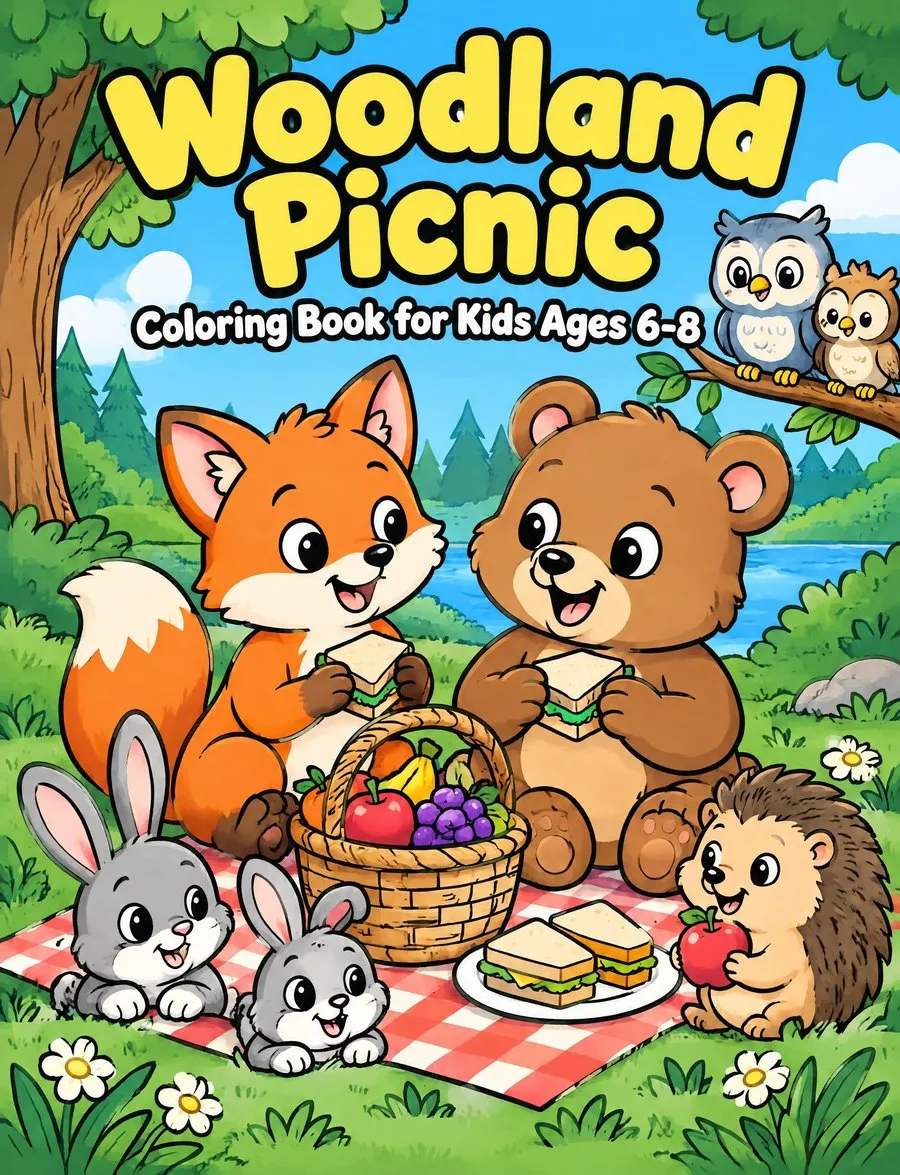
A good coloring book cover has a big, readable title and colored art that reflects the pages inside. It names the audience, keeps the back barcode area clear, and uses a file sized to KDP’s rules. The job is simple: show buyers what the book is before they have to squint. Every KDP rule below comes from the KDP Help pages linked in each section, which we checked on November 11, 2026.
What Goes on a Coloring Book Cover
The front identifies the book, the back supports that promise, and the full wrap meets the printer’s technical requirements.
On the front, give the title the most space. Add the book type, such as “coloring book” or “activity book,” so a small image still makes sense. Name the intended reader when that information helps distinguish the book. The artwork should look like it belongs with the pages inside rather than with a different product.
A practical front-cover hierarchy is:
- A large title that remains readable as a thumbnail
- The book type in plain words
- Artwork drawn in the style of the interior
- The intended reader, such as kids or toddlers
- The author name and any subtitle used in the KDP listing
The back can carry a short description and related artwork. It also needs an empty barcode area. The spine connects both sides, but thin books should not have spine text.
KDP requires the cover text to match the book details entered during publishing, including the title and author. Its Paperback Submission Guidelines also list a missing front title, a missing barcode, and PDF-creation logos or watermarks as common failure points.
What 12 Kids’ Bestseller Covers Show
The independent bestseller covers we examined share the same basic layout, though this small snapshot cannot show what causes sales.
On November 6, 2026, we read Amazon.com’s top 100 “Children’s Coloring Books” Best Sellers list (the whole list is analyzed in best selling coloring books on Amazon). We found 16 carrying the “Independently published” imprint, which a free KDP ISBN produces. Some self-publishers use their own imprint, so 16 is a floor. We could load and examine 12 of those 16 cover images.
| What the cover shows | Covers |
|---|---|
| Full-color artwork, with black-and-white interiors | 12 of 12 |
| Color reaching every edge, without a white frame | 12 of 12 |
| The book type written on the front | 12 of 12 |
| Large block-letter title filling roughly the top third or more | 12 of 12 |
| Intended reader named | 6 of 12 |
| Age range shown in numbers | 2 of 12 |
| Content count shown | 2 of 12 |
Every number in this table comes from our look at the Amazon kids’ coloring books Best Sellers list on November 6, 2026. The list changes, and twelve books from one day form a small sample. Treat these results as a snapshot, not a formula.
The art used the same bold-outline style found on coloring pages, but filled with color. Subjects included a duck, snail, strawberry, mushrooms, sea animals, princesses, unicorns, and snack foods. The covers did not hide the activity behind unrelated decoration.
Two layouts appeared. One used a single large character or object, such as a duck or a snail made of dots. The other built a collage of smaller objects around the title, including food, sea life, or cozy objects.
Activity-specific books showed the activity itself. Dot-marker art used dots on a snail, while a preschool cutting book showed scissors and cut lines. That is useful guidance when you collect coloring book cover ideas: make the format visible instead of asking the subtitle to explain everything.
Three of the twelve covers came from one publisher and shared a series style. They repeated the same lettering and placed “Bold-Easy Coloring Book” beneath the title. The shared treatment made the books recognizable as related without making their subjects identical.
Design the Front Cover
Build the front around one readable promise: what the book is, who it is for, and what its pages look like.
Start at thumbnail size. Make the title large and use clear lettering rather than squeezing in extra decoration. Put the title near the top if that gives it room, then let the art carry the subject. Add the book type in words and name the reader where useful.
Choose either one strong subject or a controlled collection of smaller subjects. A single character gives you a simple focal point. A collage can show variety, but each object still needs enough space to read clearly. In both cases, use the same drawing language as the interior pages.
Avoid borrowed characters. Bluey, Disney, Pokémon, and other licensed properties require rights you do not have. KDP makes publishers responsible for intellectual property under its Content Guidelines.
Should the Cover Be in Color?
Color is the common choice in the sample, but KDP does not require it.
All twelve covers in our November 6, 2026 look at the list used full-color artwork, although their interiors were black and white. Color also extended to every edge on all twelve. These covers share that approach; the snapshot does not prove that color raises sales.
Your art should still represent the actual pages. One sensible method is to select a line drawing from the book and color it for the front. If you keep the drawing black and white, use the surrounding layout, background, and typography to make the cover deliberate rather than unfinished.
KDP recommends CMYK cover images and says embedded color profiles are removed. The Create a Paperback Cover guide also requires images at their full intended size, flattened, and at least 300 DPI.
The Back Cover and Spine
Keep the back concise and reserve its lower-right corner, while treating the spine as usable only when the page count allows it.
What Do You Put on the Back of a Coloring Book?
Put a short description on the back, with optional artwork that does not compete with the practical information.
A one-line description may be enough for a simple kids’ book. It can say what the child will color, identify the intended audience, or clarify the activity. Keep it consistent with the title and front artwork.
If you do not provide a barcode, KDP adds one free in a 2 × 1.2 in white box at the lower right of the back. Anything placed there will be covered, according to KDP’s Barcodes guidance.
The paperback file is not three separate panels. KDP requires one PDF containing the back, spine, and front as a single image.
KDP permits spine text only when a book reaches 80 pages: one help statement says “at least 79,” another says “more than 79,” and Cover Creator needs 80. KDP also requires 0.0625 in of clear space on each side of spine text. Both rules come from its Create a Paperback Cover guide.
Coloring Book Cover Size and File Rules
Calculate the complete wrap from the exact trim size, paper, and final page count rather than guessing from the front dimensions.
The Create a Paperback Cover guide defines full width as bleed plus back width, spine width, front width, and bleed. Full height is bleed plus trim height plus bleed, with 0.125 in bleed on every side.
For black ink, the same guide gives spine width as page count multiplied by 0.002252 in on white paper or 0.0025 in on cream paper.
Use the free KDP cover calculator to get the complete dimensions, spine width, and a 300 DPI PNG template. For more context on choosing the page dimensions first, read the KDP coloring book trim size guide.
What Is the Typical Cover Size for a Coloring Book?
An 8.5 × 11 in trim led our kids’ sample, but the complete cover size changes with the spine.
In the Amazon.com search results we read on November 6, 2026 (145 coloring paperbacks, data in our size guide), 8.5 × 11 in led kids’ books at 60%, followed by 8.5 × 8.5 in at 16%. Among the 16 independent books on the Amazon kids’ coloring books Best Sellers list that day, 12 were 8.5 × 11 in, 3 were 8.5 × 8.5 in, and 1 was 6 × 9 in.
Here are calculated white-paper examples using KDP’s formula (2026):
| Trim and pages | Spine | Full cover |
|---|---|---|
| 8.5 × 11 in, 100 pages | 0.2252 in | 17.4752 × 11.25 in, or 5243 × 3375 px at 300 DPI |
| 8.5 × 11 in, 24 pages | 0.054 in | 17.304 × 11.25 in |
| 8.5 × 8.5 in, 100 pages | 0.2252 in | 17.4752 × 8.75 in |
KDP says cover text must be at least 7 pt, sit at least 0.125 in inside trim lines, and stay out of the spine from both panels.
KDP prints covers on 80 lb, or 220 GSM, white stock with a glossy or matte finish, according to Print Options. Files over 650 MB will not convert, and KDP recommends 40 MB or less in its Paperback Submission Guidelines.
How to Make a Cover for a Coloring Book
Choose a production route, build the exact full wrap, and check every required area before exporting one PDF.
You have four straightforward options:
- Design it in an app such as Canva using a template made for your exact dimensions. Use the calculator’s PNG template or KDP’s own cover template.
- Use KDP Cover Creator, KDP’s free design tool inside KDP.
- Hire a designer and give them the final trim size, paper choice, page count, and book details.
- Use the CrayonForge coloring book generator, which paints a full-color front in the style of your pages and builds the wrap to match the interior files.
CrayonForge is an AI coloring book maker for Amazon KDP, currently focused on kids ages 3 to 12. Its Cover step takes the title, subtitle, author, and back text. It can then paint a front cover: one full-color picture of the book’s world, drawn in the style of your pages, with the title and the book type lettered in it, the way the bestsellers above show them. The author name is printed at the bottom, and the back shows four pages from the book beside the blurb.
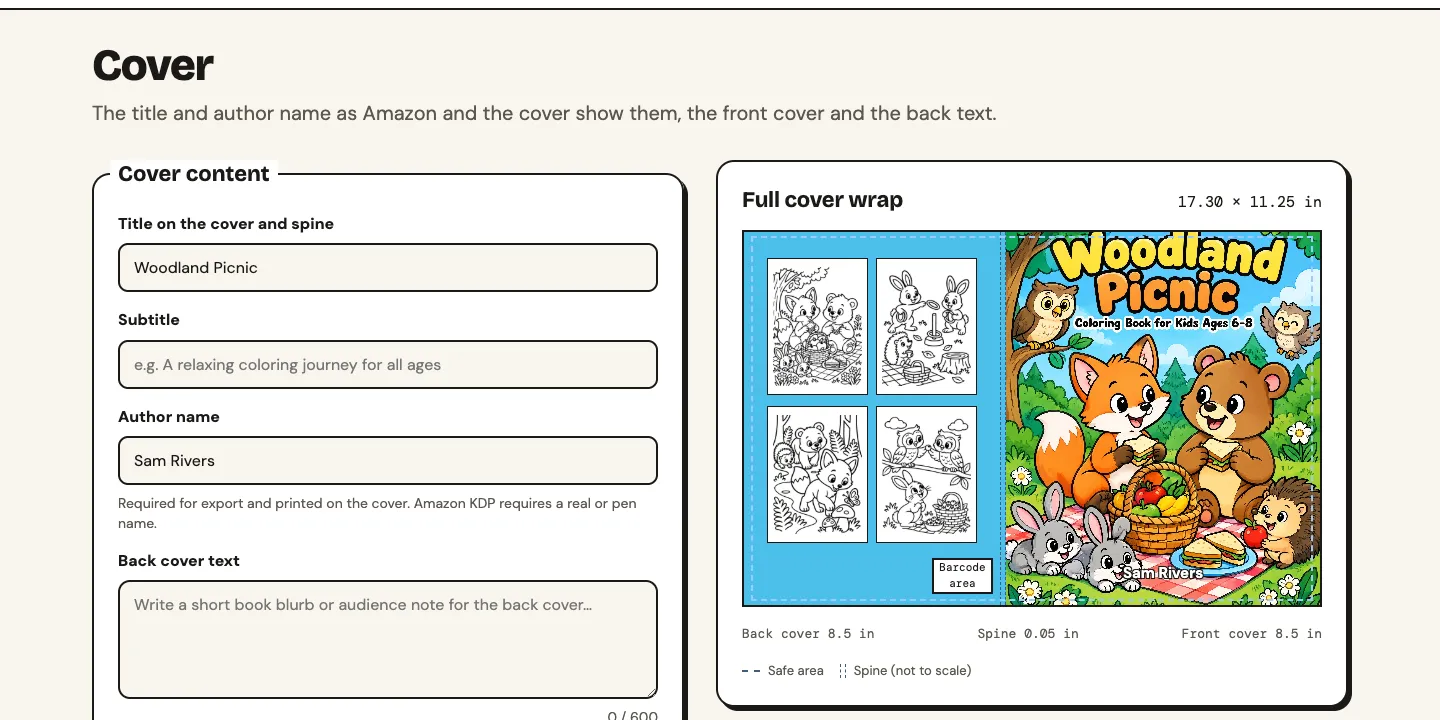
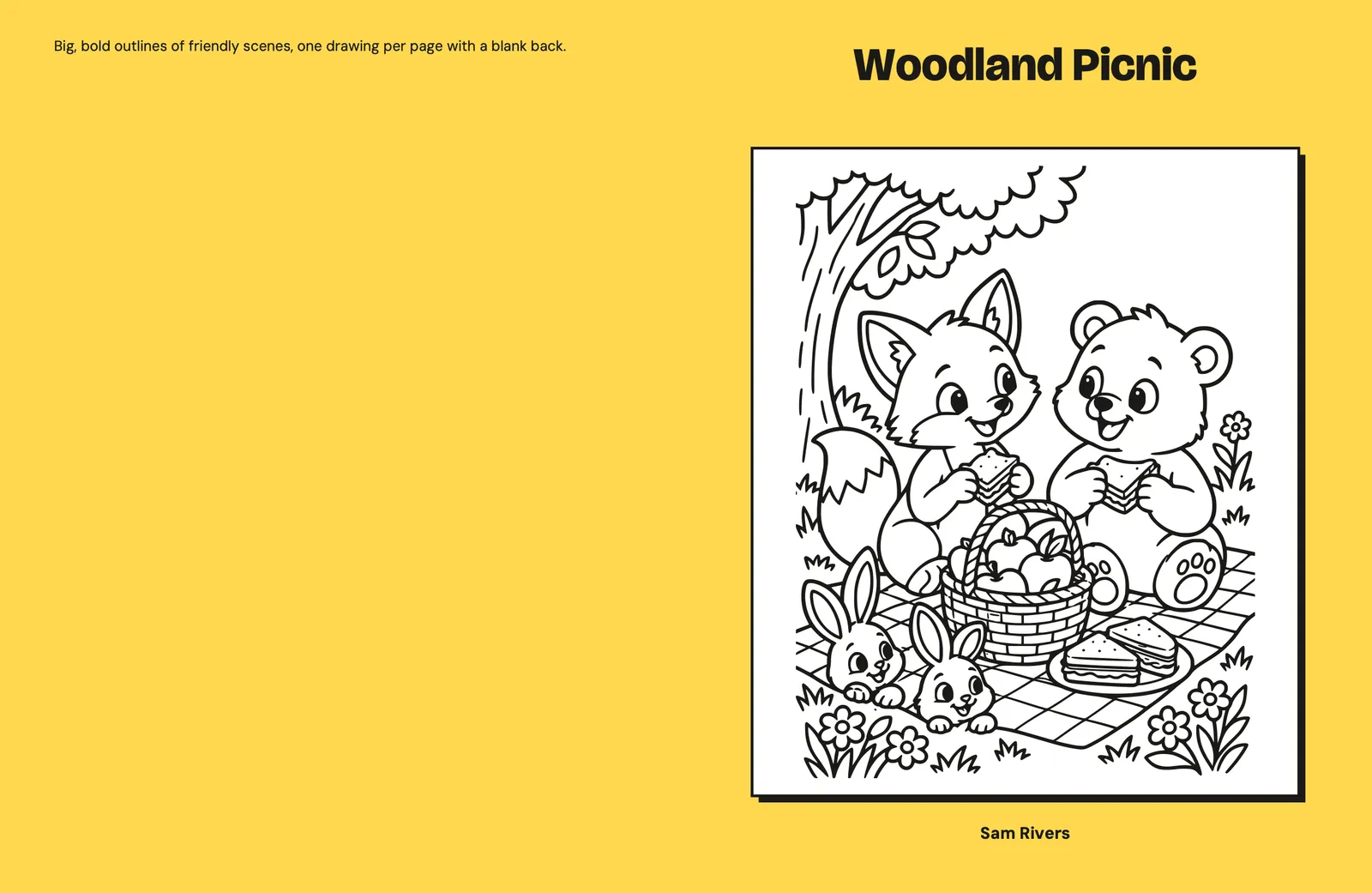
After painting, CrayonForge reads the lettering back and repaints at no charge if the title came out misspelled. Painting costs credits, shown on the button; every cover you paint is kept, so you can switch between them. The simple cover is free: one of your black-and-white drawings framed on a yellow background.
The tool calculates the spine from the final page count, adds spine text only from 80 pages, and keeps the barcode area clear. It exports cover.pdf beside interior.pdf.
CrayonForge also does not publish the book. You upload both PDFs to KDP yourself. The complete coloring book process covers the stages around the cover.
KDP classifies AI-generated cover images as AI-generated content that publishers must disclose, under its Content Guidelines.
Before uploading your KDP coloring book cover, check:
- The title is large and readable at thumbnail size.
- The book type and intended reader are named.
- The art matches the style of the interior pages.
- Nothing important sits in the bleed.
- Text stays at least 0.125 in inside the trim.
- The 2 × 1.2 in barcode area remains empty.
- Spine text appears only at 80 pages or more.
- The cover title and author match the KDP book details.
- Images are 300 DPI.
- The back, spine, and front are exported as one PDF.
A successful coloring book cover states what the book is, shows its visual style, and fits the exact KDP template. When your files are ready, start a coloring book and build the wrap from the finished pages.
CRAYONFORGE
Make your kids' coloring book for KDP
Describe the theme and age, get a scene for every page, draw them, then export interior.pdf and cover.pdf checked against KDP's rules. New accounts get 5 free credits.
More guides
Nov 12, 2026
30 Kids' Coloring Book Ideas, Checked Against Real Amazon Data
Which kids' coloring book themes sit high on Amazon, which have room for an independent publisher, and which ideas to skip, from 153 books read on November 12, 2026.
READ THE GUIDE
Nov 12, 2026
Cream or White Paper on KDP: Which Suits a Coloring Book?
White and cream paper cost the same to print on KDP; what changes is the spine and the page limit, and we checked what 203 kids' coloring books on Amazon say about paper.
READ THE GUIDENov 12, 2026
How to Publish a Coloring Book on Amazon KDP, Field by Field
To publish an Amazon KDP coloring book you fill in three pages (Details, Content, Rights & Pricing), and four answers differ from other books: leave Low-content unticked, take the free ISBN, skip Expanded Distribution and disclose AI-generated drawings.
READ THE GUIDE